Boost Cleaner
- 3.6
- Rating
- 10.00K
- Installs
- Free
- Price

 Analysis by App-foxy
I approached Boost Cleaner as a practical productivity tool rather than a magic speed button. Its purpose is straightforward: scan the storage on an Android device, present cleanup suggestions, and let me manage installed apps through controls that are meant to be easy to understand. That focus matters because cleaning tools can become confusing very quickly, especially when they ask users to remove files without explaining what those files are.
In my experience, the most useful part of this app is the review step between scanning and deleting. I do not want a cleaner that treats every large file as disposable. I want to see suggestions, pause, and decide what actually belongs on my phone. Boost Cleaner is aimed at that kind of hands-on cleanup, making it more suitable for someone who wants guidance without handing the entire process over to an automatic routine.
It is a free productivity app from Wycked Few, available for Everyone, and its current version is 3.0.0. The app has passed the early discovery stage with over ten thousand installs, while its average score sits at 3.6 from roughly sixteen ratings. That is a modest sample, so I would treat the rating as a useful signal rather than a final verdict. The app is compatible with Android 8.0 and later.
You May Also Like

 AccuWeather: Weather Radar
AccuWeather Review: A Quick, Clear Forecast for Everyday Decisions
For everyday plans, the best forecast is the one you can understand quickly. AccuWeather makes rain timing, radar, and local conditions easy to act on, with a few trade-offs.

 Hill Climb Racing
Why Hill Climb Racing Still Turns Crashes Into One More Run
A tiny car, a bumpy hill and one more upgrade: Hill Climb Racing keeps resurfacing because its simple chaos makes every near-miss feel personal.

 AliExpress - Shopping App
AliExpress Makes Global Shopping Feel Personal, but Shoppers Bear the Risk
AliExpress turns a global marketplace into a pocket-sized discovery engine. Its reach is useful, its shopping loop compelling, and its trade-offs easy to miss.

 Lords Mobile: Kingdom Wars
Lords Mobile Is a Kingdom-Building Routine, Not a Quick Match
A case-by-case verdict on the building, battles, device demands, and social commitments that make Lords Mobile rewarding for some players and exhausting for others.

 PDF Scanner app - TapScanner
TapScanner Makes Paperwork Easier to Capture, Check, and Share
TapScanner makes scanning with a phone feel less like a rescue operation and more like a dependable step in getting work done. Its capture tools are useful, though not flawless.

 Block Blast!
 Shows How Much a Puzzle Game Can Leave Out
A quiet grid game shows why puzzle players increasingly value instant clarity, repeatable skill and low-pressure play—and where the genre still needs to catch up.
More From Our News Desk
View All News


How Boost Cleaner feels during everyday cleanup
I find the most useful way to approach a cleanup app is to decide what problem I want it to solve before I open it. In this section, I’ll focus on how a guided review can fit into ordinary phone maintenance, including the small choices that help me avoid deleting something I still rely on. That also sets up a closer look at what the app’s scan and management workflow can—and cannot—do.
Speed expectations before the scan
The first thing I would clarify is what “boost” should mean here. A storage scanner can help me find clutter, but it cannot turn an older phone into a newer one. The potential benefit comes from making space and reducing the amount of material I keep on the device, not from a guaranteed transformation of processor speed or battery life.
That distinction makes the app easier to judge fairly. A scan is most useful when my phone is crowded, downloads have accumulated, or I have stopped remembering which apps I installed for one temporary task. In those situations, a focused review can feel faster than searching through folders manually. The value is less about a dramatic animation and more about shortening the path from “I need space” to “I know what can go.”
I also like the idea of clear controls because cleanup is a high-risk activity when the interface is vague. Before confirming anything, I would check the suggested items individually, especially if the device contains work files, offline maps, downloaded videos, or photos that are not backed up elsewhere. A cleaner should support a decision, not replace one.
A realistic heavy-use moment
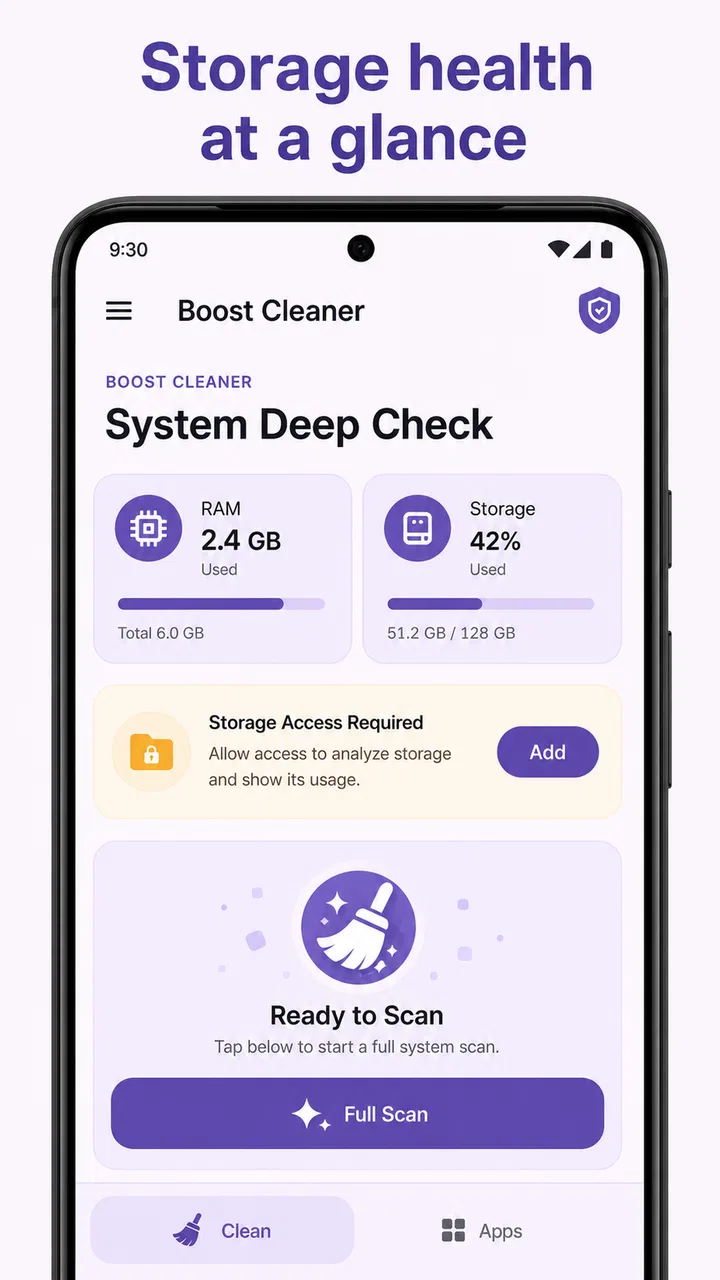
Imagine I am preparing for a trip and my phone warns me that storage is getting tight. I have saved travel documents, downloaded entertainment, several messaging attachments, and a handful of apps I used only once. This is where Boost Cleaner makes sense as a starting point. I can run a storage review, inspect the cleanup suggestions, and then move to app management instead of opening every settings screen separately.
The important workflow is to separate urgent removal from general tidying. I would first look for obvious temporary material or apps I recognize as unnecessary. Next, I would review anything connected to travel or communication, because those files may be useful even if they look old. Only after that would I consider removing larger items. This approach reduces the chance of freeing space quickly and then regretting the decision later.
A second useful situation is a shared household device where the owner is not comfortable navigating Android settings. The app’s plain cleanup controls may make the process less intimidating. I would still supervise the review, but the scan can provide a more approachable inventory than a long settings menu. That is a practical strength for less technical users, provided they understand that suggestions are not automatically safe to accept.
What happens when the device is already under pressure
Heavy storage use changes the experience of any cleaner. If the phone is nearly full, the scan itself may take more patience than it would on a lightly used device. I would not interpret a slower review as proof that the app is unstable; scanning a crowded storage area is simply a more demanding task than checking a mostly empty phone.
There is also a trade-off in using a cleaner while other apps are active. If I am downloading a large file, recording video, updating several apps, or moving media between folders, the storage picture can change while Boost Cleaner is reviewing it. In that situation, I would finish the active transfer first and run the scan afterward. Otherwise, a suggestion may no longer reflect the device’s current state by the time I act on it.
For the same reason, I would avoid treating one scan as a permanent diagnosis. Storage is dynamic. Messaging apps, browsers, social apps, and media tools can create new files soon after a cleanup. Boost Cleaner is more useful as an occasional maintenance checkpoint than as something I would leave running constantly in the background.
Managing apps without losing track of purpose
The app-management side is potentially more valuable than a one-time cleanup, because unused apps are easy to forget. I have often installed something for a single event, test, or short project and then left it untouched. A dedicated review gives me a reason to question those installations instead of allowing them to occupy space indefinitely.
My advice would be to use app management in categories. First remove apps that I clearly recognize and no longer need. Then look at apps with overlapping purposes, such as several tools that handle the same basic task. Finally, leave unfamiliar apps alone until I can identify them. Deleting something simply because its name looks unimportant is a poor trade-off if it supports another app or contains information I still need.
This is one of the less obvious benefits of a cleanup tool: it can expose decision fatigue. When a phone has too many apps, the problem is not only storage. It becomes harder to find the right tool, updates take longer to review, and the home screen becomes less useful. A careful app-management session can improve organization even when the amount of recovered space is small.
Reliability and the importance of review controls
For me, reliability in a cleaner is not just whether the scan finishes. It is whether the results are understandable and whether I remain in control before anything is removed. Boost Cleaner’s central promise of reviewable suggestions points in the right direction. I would rather have a list that requires attention than a one-tap “clean everything” action that encourages careless decisions.
Still, I would keep normal Android habits in place. Important photos and documents should have another copy before I perform any broad cleanup. I would also avoid deleting files merely because they are old, large, or unfamiliar. Age and size are clues, not proof that something is disposable.
The rating of 3.6, based on a small number of ratings, suggests that experiences may vary. I would not use that figure to label the app unreliable, but I would set realistic expectations: this is not a mature, universally proven maintenance standard. I would test it first with low-risk cleanup, observe how clearly it presents its suggestions, and only then use it for more substantial housekeeping.
One practical habit improves reliability: take a quick note of what I intend to remove before confirming a large cleanup. If something important later seems missing, I have a better idea of what action caused the change. That may sound cautious, but storage tools deserve caution because their usefulness depends on the user understanding the consequences.
Resource demands and device constraints
Boost Cleaner supports Android 8.0 and newer, which gives it a reasonably broad range of compatible devices. That does not mean every compatible phone will feel identical. Older hardware, limited free storage, and devices with many installed apps can all affect how comfortable a scan feels.
On a modest phone, I would run the app when I am not relying on the device for something urgent. I would not start a deep cleanup immediately before a call, a navigation session, or an important recording. Even if the task is normally manageable, leaving some breathing room avoids turning a maintenance job into a disruption.
There is also a resource trade-off in keeping any utility installed. If I use Boost Cleaner only once every few months, I should ask whether its convenience outweighs the space and attention occupied by another app. On the other hand, if I regularly manage a crowded device or help family members with storage problems, the dedicated workflow may justify keeping it available.
I would be especially careful on phones with very little remaining space. A cleanup app cannot solve every low-storage problem if the largest items are essential. In that case, moving photos to another location, removing offline media manually, or uninstalling a genuinely unnecessary app may be more effective than repeatedly scanning. Boost Cleaner can help identify the candidates, but it cannot decide what I value.
Where it differs from the usual alternatives
The obvious alternative is Android’s own storage and app settings. Those built-in tools are often the safer first stop because they are already part of the operating system and are familiar to many users. If I only need to uninstall one app or check available space, opening system settings may be quicker than using another utility.
Boost Cleaner becomes more appealing when I want a single, more guided review rather than several separate settings pages. Its combination of storage scanning, cleanup suggestions, and app management creates a more task-focused experience. That convenience is its main argument, not a claim that it can replace every system tool.
Another alternative is a file manager. A file manager gives me more direct control over folders and individual files, which is better for someone who understands the device’s storage structure. The downside is that it demands more knowledge. Boost Cleaner is the more approachable choice when I want suggestions first, while a file manager is better when I need precise manual organization.
Users who already have a trusted backup and file-management routine may gain little from adding this app. Likewise, anyone expecting automatic performance miracles should skip it. The right audience is someone who wants a guided inspection and is willing to read the results before approving changes.
Three habits that make the app more useful
My first tip is to scan before deleting anything, then leave the results open long enough to group decisions mentally. I would handle obvious clutter separately from uncertain files. This prevents a large suggested total from pressuring me into removing items I may need later.
My second tip is to use app management as a monthly decision list rather than a panic response. I would ask whether I have used each questionable app recently, whether it stores local information, and whether reinstalling it would be easy if I change my mind. That turns the tool into a way to control app sprawl, not just recover space during an emergency.
My third tip is to repeat the scan after major changes, but not immediately after every small deletion. If I remove several apps or a large batch of media, a fresh review can show the updated situation. Running scans too frequently, while storage activity is still changing, adds effort without necessarily improving the decision.
A fourth useful habit is to treat the suggested cleanup amount as an estimate for planning, not a target I must reach. Recovering a smaller amount safely is better than chasing a larger number and losing something valuable. That mindset is particularly important for users who store documents, creative projects, or offline content locally.
Who should use it and who should pass
I would recommend Boost Cleaner to Android users who regularly run out of space, dislike digging through settings, or want a guided way to review installed apps. It may also suit people helping another person maintain a phone, because a focused scan can make the conversation more concrete: we can look at suggestions together instead of guessing which folders matter.
I would be more hesitant to recommend it to advanced users who already understand their storage layout and prefer direct file-by-file control. A file manager or the system settings may be faster for them. I would also tell cautious users with irreplaceable local files to start slowly, back up first, and avoid broad approvals until they understand how the suggestions are presented.
The app is free, which lowers the barrier to trying it. Its Everyone content rating also makes it broadly approachable from an age-classification standpoint. Even so, ease of access should not be confused with permission to be careless. The important question is not whether the interface looks simple; it is whether I can identify each proposed action before confirming it.
My performance verdict
After weighing its purpose against realistic device limits, I see Boost Cleaner as a sensible maintenance assistant rather than a guaranteed speed enhancer. Its strongest case is the guided path from storage scan to reviewed cleanup suggestions and app management. That can save time for people who would otherwise postpone housekeeping or feel lost in Android’s settings.
Its performance will naturally depend on the phone, the amount of stored material, and what else the device is doing. I would use it during a quiet moment, avoid scanning while important transfers are active, and judge the experience by how clearly it helps me make safe decisions. Those habits matter more than expecting a dramatic before-and-after effect.
My recommendation is cautious but positive: try it if your phone feels cluttered and you want an organized review, especially if manual storage management is frustrating. Keep backups, inspect suggestions, and remember that removing unnecessary material is different from repairing hardware limitations. For a user who wants control with a little guidance, Boost Cleaner earns a place in the toolkit; for someone seeking automatic, measurable performance recovery, a different approach will be more appropriate.
FAQs for Boost Cleaner
01What is Boost Cleaner, and what does it do?
Boost Cleaner is a mobile utility designed to help manage storage and improve device organization. After scanning the phone, it can typically identify unnecessary files, cached data, duplicate or similar photos, large files, and unused content. It may also provide tools for memory or battery management, depending on the version and operating system. Results can vary by device, so it should be viewed as a maintenance assistant rather than a guaranteed performance booster.
02Is Boost Cleaner safe to use on Android or iPhone?
Boost Cleaner can be safe when downloaded from the official Google Play Store or Apple App Store and used with care. Before deleting anything, review the scan results because some files may still be useful. The app may request access to photos, files, storage, or other device information to perform its features. Check the permissions and privacy policy, and avoid unofficial APK files or modified versions that could contain security risks.
03Can Boost Cleaner really make my phone faster?
Boost Cleaner may help a phone feel less cluttered by removing temporary files, clearing unnecessary downloads, or freeing storage space. However, it cannot overcome hardware limitations, repair a damaged battery, or transform an older device into a new one. Modern Android and iOS systems already manage memory automatically, so closing every background app is not always beneficial. Its most noticeable advantage is usually storage organization rather than dramatic speed improvements.
04Does Boost Cleaner delete photos, contacts, or important files?
The application should not remove personal content without user confirmation, but cleaning tools can still require careful review. Duplicate-photo and large-file scans may suggest items that appear unnecessary but are actually valuable. Before confirming deletion, open the selected files and verify that important photos, videos, documents, and downloads are backed up. If the app includes a recycle bin or recovery period, learn how it works before performing a deep cleanup.
05Is Boost Cleaner free, and does it include subscriptions or advertisements?
Boost Cleaner may be available as a free download while offering advertisements, limits on certain tools, or optional premium features. Depending on the app version and platform, advanced cleaning, photo management, privacy tools, or an ad-free experience may require an in-app purchase or recurring subscription. Review the pricing page carefully before starting a trial, especially the renewal terms, cancellation process, and whether deleting the app automatically cancels the subscription.
Pros
- Quickly identifies junk files and unused app data.
- Simple interface makes cleaning accessible for beginners.
- Includes tools to manage large files and duplicate photos.
- Can help free storage without manually checking every folder.
- Offers battery and memory optimization features in one place.
Cons
- Some cleaning results may require manual review before deletion.
- Certain features can be limited or locked behind a subscription.
- Background optimization may have a noticeable effect on battery life.
- Aggressive cleanup suggestions could remove files you still need.
- Performance benefits may be modest on newer devices.

Boost Cleaner
Gallery